If your system uses a software license, you will need to send your Machine Id and Serial Number details to your ClearSCADA provider. They will then provide you with a new, upgraded software license file.
- In Windows, select the All Programs option, followed by Schneider Electric ClearSCADA and finally Configure Connections.
The ClearSCADA Client Applet runs. - Select the Licensing button.
The Client Licensing dialog box is displayed.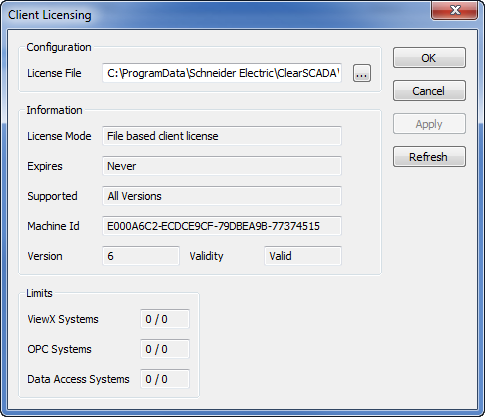
- Copy the entire entry in the Machine Id field to your PC’s clipboard.
- In an e-mail program, create a new e-mail and paste the Machine Id into it.
- Locate the ClearSCADA Serial Number. This is shown on the DVD case in which your ClearSCADA installation disk was provided.
- Enter the Serial Number into your e-mail.
- Send the e-mail containing your ClearSCADA Machine Id and serial number to your ClearSCADA license provider. The license provider will then send you a new license file and installation instructions.